
FamilyAlbum - Photo Sharing
MIXI, Inc.Parenting
4.86.30K Reviews
- Version
- Varies With Device
- Installs
- 10.00M
- Age Rating
- Teen
Screenshots



Our Review of FamilyAlbum - Photo Sharing
 Analysis by Appyee
When photos of a child are involved, convenience is only part of the decision. I want to know who the sharing space is for, what choices I can make before posting, and whether it fits the way my family already handles pictures. FamilyAlbum - Photo Sharing is a parenting app from MIXI, Inc. built around keeping a child’s photos and videos in a family-focused place. That focus can be reassuring, but I’d still treat any online collection of family moments thoughtfully: a small audience is a useful boundary, not a reason to post without considering what is in the frame.
A family space, not a public photo feed
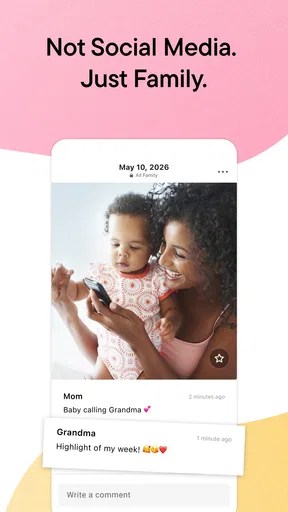
The app’s main appeal is its specific purpose. Instead of mixing baby pictures with holiday snaps, work screenshots, and every other image on a phone, it gives relatives a shared place to follow a child’s growing-up moments. I find that distinction useful for families who want grandparents or other close relatives to see updates without sending each picture through a group chat.
That choice also shapes who may prefer something else. If you want a public profile, creator tools, or a general-purpose cloud library for every kind of photo, this isn’t the same kind of product as a social network or a broad photo backup service. Its value is strongest when the people invited are already part of the child’s close circle and the family wants a dedicated record rather than a public audience.
Think about the audience before you upload
Family photos can include more than the child: a home interior, a school uniform, a location clue, or relatives who did not expect their image to be shared. I’d make a quick habit of checking the background and the intended audience before posting. For a particularly sensitive moment, sending a picture directly to one person—or keeping it off a shared service—may be the better call.
I would also agree on a simple family norm before inviting people: who can contribute, which kinds of moments should stay private, and whether anyone should ask before sharing a picture beyond the family space. Those conversations matter because an app can organize a group’s memories, but it cannot make everyone in that group equally careful. A private family workflow works best when its members understand the same boundaries.
What Makes FamilyAlbum Stand Out?
First off, the ease of use is what caught my attention. The app is super user-friendly, so even the least tech-savvy grandparent can navigate it like a pro. You can create albums and invite family members to contribute, making it a collaborative space for everyone. It’s like a digital version of passing around a photo album at family gatherings, minus the risk of spilling coffee on it!
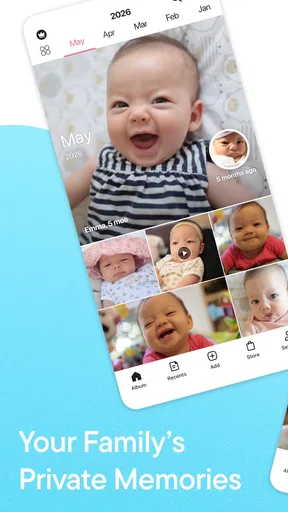
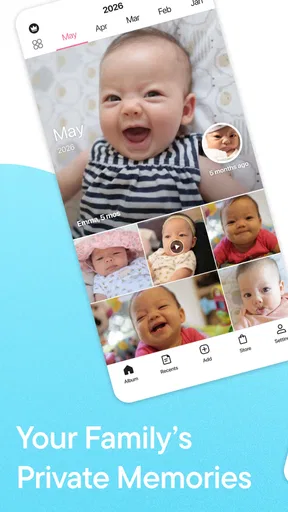
Another cool feature is the timeline. FamilyAlbum automatically organizes your photos by date, which means you can easily scroll through and relive those special moments without having to remember when they happened. It’s like having a personal memory curator at your fingertips.
Sharing Memories Made Simple
Sharing photos has never been this personal and secure. You can share albums with selected family members, ensuring that your precious memories don’t end up floating around the internet. Plus, the app offers unlimited storage, so snap away without worrying about space.
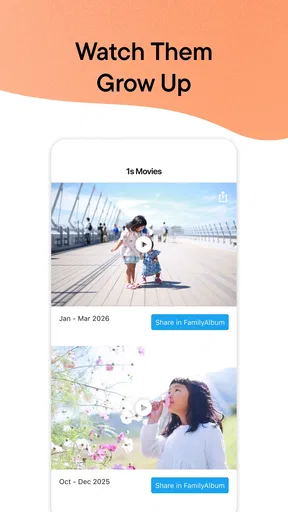
What’s also neat is the video feature. You can upload videos and the app will automatically create a monthly one-second highlight reel, capturing the essence of your month in a fun, shareable format. It’s perfect for those who love a good montage.
Customization and Privacy
If you’re big on customization, FamilyAlbum lets you add captions, comments, and even stickers to your photos, making each memory truly your own. And don’t worry about privacy; the app takes that seriously with encrypted data and the ability to control who sees what.
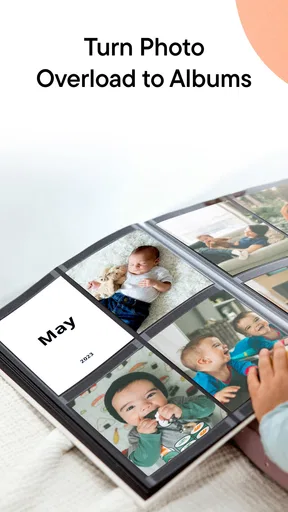
For those who like a tangible touch, there’s an option to order photo books directly from the app. It’s a great way to get those digital memories off your screen and into your hands.
Everyday habits that make the archive useful
A practical routine matters more than uploading every single picture. On a busy day, I’d choose a few images that tell the story—first steps, a funny face at breakfast, or a visit with a relative—and add a short caption while the details are still fresh. That small note can make a timeline easier to understand months later, especially when several similar photos were taken in one afternoon.
For a family with relatives in different places, a realistic rhythm might be to upload a small batch after a weekend visit, then let everyone catch up when they have time rather than expecting an immediate reply to each post. Comments can make the archive feel conversational, but I wouldn’t treat them as a substitute for a direct message when something needs a timely answer. The app is best as a place to revisit moments, not as the family’s urgent communication channel.
One useful trade-off is that a shared timeline is easiest to browse when contributions are reasonably consistent. If relatives upload the same event repeatedly or use very different caption habits, the record can feel less curated. I’d agree on a light touch—post the best few images, label unusual occasions, and avoid turning every routine snapshot into an alert for the whole family. That keeps the archive warm rather than noisy.
Where it fits beside familiar alternatives
Compared with sending pictures in a family messaging group, a dedicated album gives memories a more lasting home: older photos are less likely to disappear beneath new conversation, and the timeline offers a natural way to revisit them by date. A chat is still better for quick coordination, sharing something with one person, or talking about a picture in the moment. I see the two as complementary rather than interchangeable.
A general cloud photo library may suit someone who wants one searchable collection for personal, work, and family images, while a social network is built for a wider audience and more public interaction. FamilyAlbum’s narrower purpose can feel calmer for relatives who only want child-centered updates. The trade-off is that it may not replace the broader organization and sharing habits already built around those other tools.
Families should also decide what they want their long-term backup routine to be. A timeline is convenient for looking back, but I would not assume that one shared app should be the only place a family keeps irreplaceable pictures. Keeping a separate copy of especially meaningful images is a sensible habit for any digital archive, particularly if multiple relatives rely on the collection.
Who will appreciate it, and who may not
I’d recommend trying it for parents who want to share a child’s milestones with a chosen circle, especially when relatives are far away or not comfortable keeping up with a busy group chat. It can also work well for families who enjoy adding context to pictures and want a growing visual record instead of a stream that is hard to search through later.
I’d hesitate if you prefer not to upload a child’s photos to an online service, if the family cannot agree on sharing boundaries, or if you mainly need a general backup for all your phone pictures. In those cases, an offline album, a carefully managed personal archive, or direct one-to-one sharing may feel more appropriate. The right choice depends less on how many features an app has and more on what level of sharing feels comfortable to the people in the photos.
Cost, expectations, and a cautious verdict
FamilyAlbum is free to install, with in-app purchases listed from $0.99 to $109.00 per item. I’d check any purchase details in the app before ordering or subscribing to anything, and distinguish optional extras from the basic reason for using it: sharing and revisiting family moments. Its Teen content rating is another reminder that this is a service families should discuss and manage deliberately, rather than treating it as a child’s unsupervised social space.
It has a 4.8 average from around 329,000 ratings, and more than 10 million installs. Those figures suggest that many families have found the format useful, but they don’t answer the personal questions that matter most: whether your relatives will actually use it, whether its sharing approach matches your comfort level, and whether you want a dedicated child-focused archive. I’d start with a small group and a modest number of photos, then see whether the routine feels natural before making it the family’s default.
Final Thoughts
In a world where digital memories can sometimes feel fleeting, FamilyAlbum offers a warm, organized space to cherish and share them with those who matter most. It’s perfect for families who are spread out across the globe or even just across town. So, if you’re looking for a way to keep your family connected through photos, this app is definitely worth a try. Happy snapping!
Privacy and Permissions
See what permissions an app requests and how it handles your data.
- Photos/Media/Files
- read the contents of your USB storage, modify or delete the contents of your USB storage
- Storage
- read the contents of your USB storage, modify or delete the contents of your USB storage
- Camera
- take pictures and videos
- Wi-Fi connection information
- view Wi-Fi connections
- Other
- view network connections, full network access, run at startup, prevent device from sleeping, read Google service configuration
Verdict
Strengths of FamilyAlbum - Photo Sharing
- Easy-to-use interface for all ages.
- Unlimited storage for high-quality photos.
- Photos organized automatically by date.
- Allows for private family photo sharing.
- Fast upload speeds for quick sharing.
Limitations of FamilyAlbum - Photo Sharing
- Limited editing tools for photos.
- No integration with other cloud services.
- Lacks desktop application support.
- Notifications can be overwhelming.
- Requires internet for full functionality.
Similar Picks in This Category
View All
Family Space
Motorola Mobility LLC.3.9

شرطة الأطفال - مكالمة وهمية
Oub Apps4.1

Findmykids: Parental Control
LETEM LTD4.6

Pregnancy + | Tracker App
Philips Electronics UK Limited4.8

Policía de niños - para padres
Kids police4.7

Pregnancy App
Amila4.9
Frequently Asked Questions
What is FamilyAlbum and how does it work?
FamilyAlbum is a photo and video sharing app designed for families. It allows users to privately share moments with invited family members. The app organizes photos by month and automatically creates albums, making it easy to relive memories. Users can also create slideshows and share updates with loved ones.
Is FamilyAlbum secure for sharing family photos?
Yes, FamilyAlbum prioritizes user privacy and security. Photos and videos are only visible to invited family members. The app uses encryption to protect data and ensures that content is not shared publicly. Users have control over who can view their family albums, providing peace of mind.
Can I use FamilyAlbum on multiple devices?
Absolutely, FamilyAlbum is available on both Android and iOS platforms, and you can access it from multiple devices. Your account syncs across all devices, allowing you to upload, view, and manage your photos seamlessly, whether you're on a smartphone or a tablet.
Does FamilyAlbum offer any storage limitations?
FamilyAlbum offers free unlimited storage for photos and videos, allowing families to upload and share as many moments as they like without worrying about space. However, there are premium options available that provide additional features, such as longer videos and more customization options.
Are there any additional features in FamilyAlbum?
Yes, FamilyAlbum provides a variety of features beyond basic photo sharing. Users can create slideshows with music, receive monthly photo books, and enjoy automatic organization of photos. The app also offers milestone tracking for children and customizable notifications for family updates.
